
Yesterday, I finally completed a task I’d been putting off for a while.
Updating outdated affiliate links across my WordPress blog.
The interesting part? I used ChatGPT to help me do it.
What could have become a tedious job of manually reviewing dozens of links turned into a much more manageable process.
And I learned a few things along the way.
If you’re running an affiliate marketing website, knowing how to update affiliate links in WordPress is more important than you might think.
Promotions expire. Products change. Affiliate programs launch new offers.
But your older blog posts can continue attracting visitors long after you’ve published them.
Here’s what happened on my website, how I approached the problem and what I’d recommend if you’re facing something similar.
Why I Needed to Update My Affiliate Links
My main affiliate marketing focus is ClickBank Profit Club, created by John Thornhill.
Earlier in my journey, I promoted a special campaign called ClickBank Profit Challenge.
I wrote several articles about the campaign, shared my experiences and included affiliate links for readers who wanted to learn more.
But the Challenge was a time-limited promotion.
Eventually, it ended.
That meant some of my older blog posts still contained links and calls to action referring to an offer that was no longer available.
Not ideal.
Especially when I’m working hard to improve my website’s visibility in Google and attract more visitors.
I wanted to replace the outdated promotional links with my regular ClickBank Profit Club affiliate link.
The Club offers a free basic membership, with optional paid upgrades.
If you’re interested in John Thornhill’s affiliate marketing system, you can explore it here:
Explore ClickBank Profit Club – Join for Free
But before changing anything, I needed to understand how many old links were actually on my website.
And that’s where ChatGPT became particularly useful.
How I Used ChatGPT to Find My Outdated Links
My WordPress blog has grown considerably since I started publishing regularly.
I’ve written about affiliate marketing, earning commissions, building an email list, traffic generation and my experiences with John Thornhill’s training.
As a result, the old Challenge links weren’t confined to one or two articles.
An earlier investigation identified 25 old clickable links across 18 published blog posts.
There was also an additional outdated address appearing as text.
That’s quite a few links to review!
Rather than trying to remember which articles contained the old promotion, I used ChatGPT to help investigate the website and organize the corrections.
One particularly useful part of the process was distinguishing between:
- Old promotional links that needed to be updated.
- Historical references that should remain unchanged.
- Internal links connecting existing blog articles.
- Links to different affiliate programs that required separate treatment.
That distinction was important.
I didn’t want ChatGPT to blindly replace every mention of ClickBank Profit Challenge.
After all, the Challenge really happened. It was part of my affiliate marketing journey.
Changing those historical references would make my older articles less accurate.
The goal was to fix the promotional links, not rewrite my history.
How to Update Affiliate Links in WordPress: My 7-Step Approach
Based on this experience, here’s how I’d approach similar updates in the future.
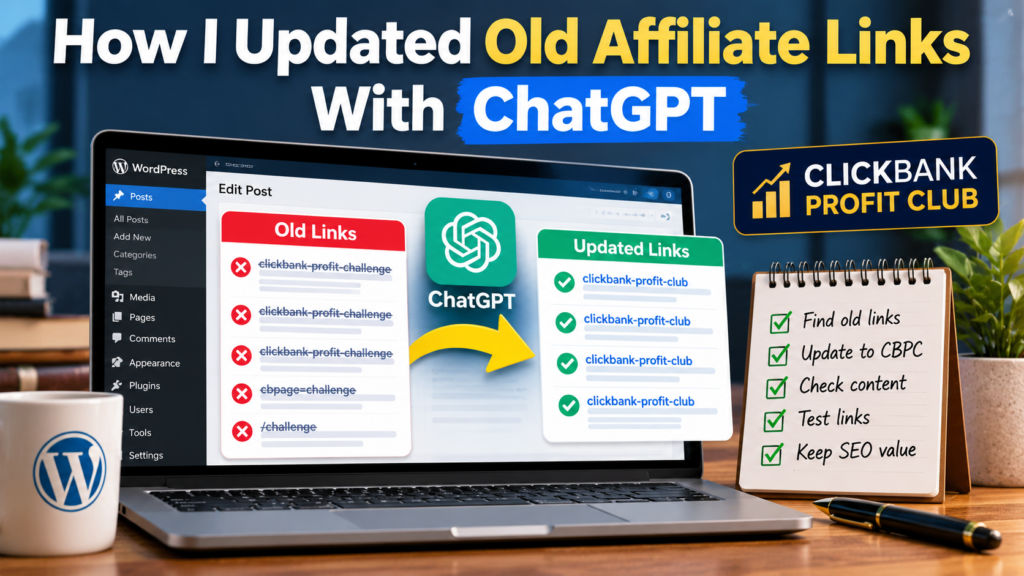
1. Identify the Expired Promotion
Start by identifying the exact affiliate link or promotional campaign that is no longer active.
In my case, the old URL was:
https://fredrikgustafssononline.com/clickbank-profit-challenge
My current promotional URL is:
https://fredrikgustafssononline.com/clickbank-profit-club
Having both addresses clearly identified made it easier to investigate which links needed attention.
2. Find Every Occurrence
Search your WordPress posts and pages for the old URL.
Also search for the promotion’s name.
Remember that a link’s visible text and its destination are not necessarily the same.
For example, an article might say “Discover the program” while linking to an expired campaign.
Check the underlying link address, not just the words readers see.
3. Create a Backup
Before updating several WordPress articles, make sure you have a recent backup.
I use UpdraftPlus for my website backups.
This is particularly important if you’re changing multiple posts, links or settings.
Even a small editing mistake can become frustrating if it affects many articles.
4. Check Your Link-Management Plugin
I use Pretty Links to manage some of my affiliate URLs.
This turned out to be particularly useful.
The destination of my old Challenge short link could be updated to point toward the current ClickBank Profit Club offer.
That meant links using the old short URL would no longer necessarily direct visitors toward the expired promotion.
However, there was an important catch.
Changing a redirect doesn’t automatically fix outdated wording in your articles.
If a blog post still says “Join the ClickBank Profit Challenge today”, readers are being encouraged to join a completed campaign.
The wording needs attention too.
5. Update the Link Text Carefully
This was one of the reasons I wanted ChatGPT’s assistance.
Instead of replacing every occurrence automatically, it was important to review the surrounding content.
For example:
Old wording: Join the ClickBank Profit Challenge Today
Updated wording: Explore ClickBank Profit Club – Join for Free
That’s much clearer for readers.
But I also had to consider links belonging to different programs.
For instance, I’m also involved with Coaching Profit System, which focuses on opportunities related to developing and marketing digital products.
A link labelled Coaching Profit System shouldn’t automatically be changed to ClickBank Profit Club just because it happens to have an outdated destination.
It needs to lead to the correct program.
If you’re interested in the digital product side of my business, you can learn more about Coaching Profit System here.
This is a good example of why AI-assisted website maintenance still requires careful instructions.
6. Verify Your Affiliate Tracking
After updating an affiliate link, don’t simply assume everything works.
Open it and check the destination.
Does the correct website appear?
Is your affiliate tracking information included?
Does the link redirect correctly?
I also use UTM parameters for tracking some of my marketing activities.
Those parameters should be preserved where appropriate.
The last thing I want is to fix an expired offer and accidentally break the tracking that helps me understand my traffic.
7. Check the Published Articles
Finally, review the updated articles.
Make sure the formatting remains intact, the correct links are clickable and the original content hasn’t been unintentionally changed.
I also recommend keeping a record of which articles have been updated.
That makes future maintenance easier, particularly as your website grows.
Can ChatGPT Really Update WordPress Affiliate Links?
Yes, with the appropriate tools and access.
But there’s something important to understand.
ChatGPT doesn’t automatically have permission to modify your WordPress website.
For direct editing, it needs access through an authorized integration or a suitable browser-based working environment.
And that access needs to be managed carefully.
In my case, I used ChatGPT to help investigate the outdated links and work through the corrections.
The process made a repetitive website-maintenance task much easier to manage.
But I still believe it’s important to verify the results rather than assume every automated change is correct.
AI is particularly valuable when it saves time without sacrificing accuracy.
That’s the approach I want to continue developing in my online business.
Why Updating Old Affiliate Links Matters for SEO
This project wasn’t just about making sure my affiliate links worked.
It also connects with my longer-term SEO strategy.
I’m gradually building a collection of articles around affiliate marketing and starting an online business.
Some of those articles are beginning to appear in Google search results.
If someone discovers an older article through Google, I want that person to find accurate information and working links.
Outdated promotional content can create confusion and undermine trust.
Updating it won’t automatically improve search rankings, but it helps maintain a better experience for readers.
Google also provides a useful SEO Starter Guide covering the fundamentals of creating and maintaining discoverable websites.
I’ve recently been working on a 30-day affiliate marketing traffic plan, and improving existing content is an important part of that strategy.
I’m also paying closer attention to articles such as my guide on starting affiliate marketing without an audience.
The lesson?
Publishing new articles matters, but maintaining and improving older content matters too.
My Latest Affiliate Marketing Progress
As for my regular business update, my total recorded affiliate commissions remain at approximately $1,670.
My email subscriber count is also unchanged since my previous update.
These are cumulative gross commissions, not net profit. I’ve invested in training, mentoring and tools along the way.
And some commissions have come through opportunities within the ClickBank Profit Club system rather than exclusively through traffic I’ve generated myself.
So there’s still plenty of work ahead.
But yesterday was a reminder that progress doesn’t always mean making another sale.
Sometimes it means improving the systems you’ve already built.
I’m looking forward to having more time for my online business during the coming week.
For now, I’m pleased that my older promotional links have been updated and that readers can explore the current offers instead of an expired campaign.
Final Thoughts
Using ChatGPT to help update my WordPress affiliate links was a useful learning experience.
It helped me tackle a task that could easily have been overlooked as my website continued growing.
And it reinforced something I’ve been thinking about more frequently.
Building an online business isn’t just about creating more content. It’s also about making what you’ve already created work better.
If you’re running an affiliate website, I’d encourage you to review your older promotional links occasionally.
A little maintenance today could prevent lost opportunities tomorrow.
Thanks for following my journey!
Fredrik
Interested in the Programs I’m Using?
ClickBank Profit Club – Free Basic Membership
John Thornhill’s ClickBank Profit Club has been an important part of my affiliate marketing journey. Its free basic membership allows you to explore the program before deciding whether any optional upgrades are right for you.
Explore ClickBank Profit Club – Join Free
Coaching Profit System – Digital Product Opportunities
I’m also exploring how to develop and market digital products of my own through the training I’ve invested in.
Discover Coaching Profit System
Affiliate Disclosure: This article contains affiliate links. If you purchase an optional paid product through one of my links, I may earn a commission at no additional cost to you. The earnings mentioned reflect my personal experience and represent cumulative gross commissions, not net profit. Results are not guaranteed, and building an online business involves effort, expenses and financial risk.